
How To Work With LLMs Without Losing Your Mind
Post Metadata
LLMs are increasingly used in software engineering research as researchers explore ways to incorporate them into tools and traditional development workflows such as testing and verification. My research for the past year or so has involved LLMs in one way or another, and I wanted to share some of the tips and tricks that have helped me keep what little remaining sanity I have.
It wasn’t so long ago when reading a paper title that included “machine learning” in the ICSE, FSE, ASE, or any of the “big” academic software engineering (SE) conferences was the exception rather than the norm. Things are a little different in 2026; here are the results of searching for a few keywords in the proceedings of ICSE ‘25:
(Out of 257 total)
- “LLM”: 37 matches
- “Large Language Model”: 20 matches
- “Agent”: 8 matches
- “Machine learning”: 3 matches
These are the papers that explicitly include those keywords in their titles, and is likely an underestimate of the true number of papers that investigate the applications of LLMs and their applications in software engineering.
Just out of curiosity, I ran the same keyword search on the proceedings of ICSE ‘23, held in May 2023 after the release of ChatGPT in December 2023 and the proliferation of LLMs into the cultural zeitgeist:
- “LLM”: 1 match.
- “Large Language Model”: 4 matches.
- “Agent”: 0 matches.
Papers often take more than half a year to go from initial ideation to appearance at a conference. The numbers above should really be taken as lagging indicators of the popularity of LLMs or LLM-adjacent software engineering research. So, given where this brave new world of SE research appears to be headed, it might be a good idea for a run-of-the-mill SE researcher to have some literacy with using LLMs—if nothing else, for the code-generating machines they are.
Here are some problems I’ve faced as a relative newcomer to this space. Perhaps you’ll find some of my findings helpful, while you might consider others to be mind-bogglingly obvious. In any case, I hope you find them useful—at least until the next generation of models come out.
Structured Output Is Your Friend
Here’s a workflow that I’ve seen multiple times (and have used, myself) when working with LLMs.
- Write up some prompt (e.g., “Write a Python function to …”).
- Call the API.
- Parse the response.
Steps (1) and (2) are relatively painless (though step 1 has the potential to be incredibly annoying with prompt “engineering”) and straightforward. Step (3) is where things get interesting.
There is high potential for a variety of different response formats, even with a simple prompt like “Write a Python function to compute factorial”. Here are some sample responses:
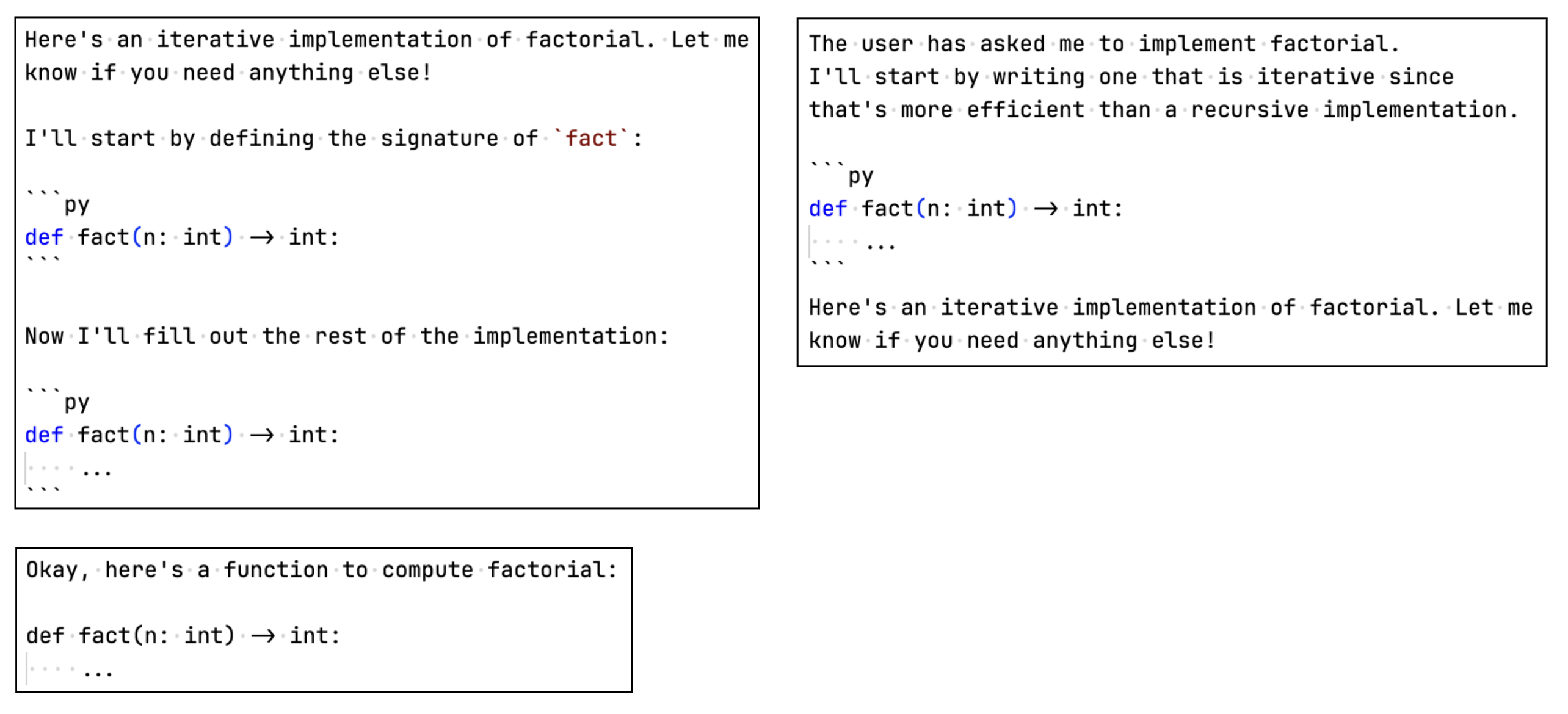
Custom logic is required to parse responses like the ones above.
You might be lucky (or unlucky, depending on your perspective) and get away with using regex to
match code fences (i.e., pairs of ```),
but this approach still falls short.
What if the model returns code outside of code fences?
Or,
if there are multiple code fences, each with different code (I have seen this first-hand)?
Though it might be possible to account for many response formats,
this is not a scalable approach.
A Solution
When faced with a problem that appears to have no known solution, a common approach is to try to transform it into a problem that has a known solution. For unexpected output formats, a solution lies in the very root of the problem itself—the fact that LLMs are capable of generating free-form text. Here’s a prompt you might use instead:
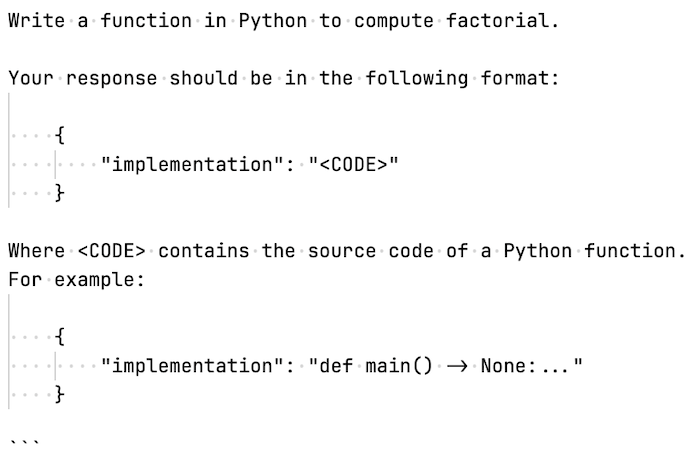
You can be even more specific about the things you don’t want in the response, and include them point-by-point in the prompt. Here’s a corresponding parser for the responses you’re likely to get back:
def parse_function(raw_llm_response: str) -> ast.AST | None:
    try:
        response = json.loads(raw_llm_response)
        return ast.parse(response["implementation"])
    except Exception as e:
        msg = (
            "Failed to parse a Python function from: "
            f"{raw_llm_response} "
            f"with error: {e}"
        )
        logger.error(f"{msg}")
        return None
No regex and string mangling required (though you might want to strip out any code fence characters
``` that the LLM might send back).
Enforcing structured output for LLM responses isn’t a new idea; Anthropic, OpenAI, and other platforms expose APIs for this very purpose, in addition to libraries like Pydantic.
However, specifying a response format directly in your prompt (and giving some examples) is a lightweight way to impose some semblance of structure without being tied to a specific model or library.
Cache Responses
When you’re building a complicated software system, you’ll hopefully have a battery of tests that run fast and often to help you validate the changes you make. File I/O and network calls are usually the bottleneck for these tests, which take relatively long compared to other operations that may occur. If you’re making network calls, you may also have to deal with flaky tests or service outages1, which are usually outside your control.
Systems built around LLMs inject another layer of complexity into the mix, not only are you going to be making network calls all the time, but you’re going to be burning through tokens and API credits. This could be a problem if you have tests that rely on LLM output (e.g., maybe your parsing function consumes the text response from an LLM). A way to get around this is to cache the responses you get back from a model. This can be as simple as just hard-coding responses into a file, or using off-the-shelf caching libraries like DiskCache.
You might be wondering: why bother caching if LLMs are non-deterministic? (i.e., there’s a chance of the same prompt resulting in different output). I won’t argue with you there, but if you’re generally working with structured output (which you really should be), your tests can rely on the fact that the structure of the output is relatively consistent. If nothing else, at least caching will spare you from flaky tests when OpenAI or Anthropic suffers a service outage.
Just remember to:
-
Carefully design your cache keys: Using the plain-text of your prompt itself might not be enough. The same prompt can result in wildly different responses depending on other factors, such as temperature, whether you’re using
top_kortop_psampling, and your system prompt. A cache key that comprises the value of any factors that affect the output is ideal. -
Consider a cache invalidation policy: It’s probably a good idea to invalidate your cache when it’s likely that model capabilities have changed (e.g., you’ve started using Claude instead of GPT, there’s been an update to the model you’re using, etc.)
Don’t Trust Them (or, Post-Processing Is Your Friend)
I don’t think I have to try very hard to persuade people of this, but you really shouldn’t trust large language models to follow instructions. For how capable large language models are in 2026, they still can, and will make mistakes. Let’s say you’re using a model for a code generation task. All you want is the source code of the function, nothing else. No natural-language explanations, no cutesy preamble (“Okay! Here’s an efficient implementation…”), no nothing. Because, let’s face it, you don’t care what it “thinks” because that’s not what you asked it for.
You might append the following directions to your code generation prompt
Your response should only comprise source code. Do not include explanations, do not comment the code.
And, sure—it might work. For a while. But, sooner or later, the LLM won’t be able to stop itself from trying to be helpful2 and you’re going to get a response that’s completely unexpected. You might try to augment your prompt in response, maybe something like:
YOUR RESPONSE SHOULD ONLY COMPRISE SOURCE CODE. DO NOT INCLUDE EXPLANATIONS!!!!, DO NOT COMMENT THE CODE!!!! IF YOU DO NOT FOLLOW THESE INSTRUCTIONS, I WILL LOSE MY JOB!!!!
And it works! Until it doesn’t. It might even be the case that explicitly directing models not to do something might increase the probability that it will do exactly that. An analogy is someone asking you to not think about a pink elephant; you probably thought of one just now.
You can play this game of repeatedly changing your prompt to mitigate any undesirable behaviour a model might exhibit. But until someone comes along and invents a model that follows your instructions every time, this approach will only go so far.
Post-processing model output before other parts of your system ingests it is a way you can avoid the pitfalls of non-determinism. For example, a system I am currently developing uses an LLM to generate method specifications for C functions. Specifically, I am asking LLMs to generate specifications that can be verified using CBMC: the C Bounded Model Checker A common mistake that an LLM tends to make generating the specification:
void fill_out_array(void *arr)
__CPROVER_assigns(arr[0], arr[1], arr[2], ...)
The high-level meaning of this specification is relatively straightforward to a human
(e.g., fill_out_array will assign a value to each slot in arr).
But this fails to verify with CBMC because the last part of the clause (, ...)) is not
syntactically valid (you can’t use ... to continue a clause).
I have a component in my system that deterministically applies “fixes” to certain error patterns
that I find myself repeatedly encountering in an LLM’s response.
My general workflow is:
- Observe the mistakes that a model appears to consistently make in its response (the incorrect syntax above is one example).
- Sketch out how to best fix it (i.e., match on the error pattern, transform it).
- Implement your fix as code, and run your “fixer” on the output where it might occur.
Acknowledgments
Huge thanks to Saul Shanabrook for his helpful comments on this blog post. Check out some of the cool work he’s doing on E-graphs!